Web 开发
- SpringMVC 自动配置概览
- 简单功能分析
- 请求参数处理
- 数据响应与内容协商
- 视图解析与模板引擎
- 拦截器
- 异常处理
- 原生 Servlet 组件 嵌入式 Web 容器
- 定制化原理
SpringMVC 自动配置概览
Spring Boot provides auto-configuration for Spring MVC that works well with most applications.(大多场景我们都无需自定义配置)
The auto-configuration adds the following features on top of Spring’s defaults:
Inclusion of
ContentNegotiatingViewResolverandBeanNameViewResolver beans.(内容协商视图解析器和 BeanName 视图解析器)Support for serving static resources, including support for WebJars (covered later in this document)).(静态资源,包括 webjars)
utomatic registration of Converter, GenericConverter, and Formatter beans.
- 自动注册 Converter,GenericConverter,Formatter
Support for HttpMessageConverters (covered later in this document).
- 支持 HttpMessageConverters (配合内容协商理解原理)
Automatic registration of MessageCodesResolver (covered later in this document).
- 自动注册 MessageCodesResolver (国际化用)
Static index.html support.
- 静态 index.html 页支持
Custom Favicon support (covered later in this document).
- 自定义 Favicon
Automatic use of a ConfigurableWebBindingInitializer bean (covered later in this document).
- 自动使用 ConfigurableWebBindingInitializer ,(DataBinder 负责将请求数据绑定到 JavaBean 上)
If you want to keep those Spring Boot MVC customizations and make more MVC customizations (interceptors, formatters, view controllers, and other features), you can add your own @Configuration class of type WebMvcConfigurer but without @EnableWebMvc. 不用@EnableWebMvc 注解。使用 @Configuration + WebMvcConfigurer 自定义规则
If you want to provide custom instances of RequestMappingHandlerMapping, RequestMappingHandlerAdapter, or ExceptionHandlerExceptionResolver, and still keep the Spring Boot MVC customizations, you can declare a bean of type WebMvcRegistrations and use it to provide custom instances of those components. 声明 WebMvcRegistrations 改变默认底层组件
If you want to take complete control of Spring MVC, you can add your own @Configuration annotated with @EnableWebMvc, or alternatively add your own @Configuration-annotated DelegatingWebMvcConfiguration as described in the Javadoc of @EnableWebMvc. 使用 @EnableWebMvc+@Configuration+DelegatingWebMvcConfiguration 全面接管 SpringMVC
简单功能分析
静态资源访问
静态资源目录
只要静态资源放在类路径下: called /static (or /public or /resources or /META-INF/resources 访问 : 当前项目根路径/ + 静态资源名
原理: 静态映射/**。 请求进来,先去找 Controller 看能不能处理。不能处理的所有请求又都交给静态资源处理器。静态资源也找不到则响应 404 页面
改变默认的静态资源路径
spring:
  mvc:
    static-path-pattern: /res/**    # 静态资源的访问前缀

  resources:
    static-locations: [classpath:/haha/]
静态资源的访问前缀
默认无前缀
自定义前缀
spring:
  mvc:
    static-path-pattern: /res/**
当前项目 + static-path-pattern + 静态资源名 = 静态资源文件夹下找
webjar
自动映射
/webjars/**
<dependency>
    <groupId>org.webjars</groupId>
    <artifactId>jquery</artifactId>
    <version>3.5.1</version>
</dependency>
访问地址:http://localhost:8080/webjars/jquery/3.5.1/jquery.js
后面地址要按照依赖里面的包路径
欢迎页支持
- 静态资源路径下 index.html
- 可以配置静态资源路径
- 但是不可以配置静态资源的访问前缀。否则导致 index.html 不能被默认访问
spring:
#  mvc:
#    static-path-pattern: /res/**   这个会导致 welcome page 功能失效

  resources:
    static-locations: [classpath:/haha/]
- controller 能处理
/index
自定义 Favicon
favicon.ico 放在静态资源目录下即可。
spring:
#  mvc:
#    static-path-pattern: /res/**   这个会导致 Favicon 功能失效
静态资源配置原理
- SpringBoot 启动默认加载
xxxAutoConfiguration类(自动配置类) - SpringMVC 功能的自动配置类
WebMvcAutoConfiguration,生效
@Configuration(proxyBeanMethods = false)
@ConditionalOnWebApplication(type = Type.SERVLET)
@ConditionalOnClass({ Servlet.class, DispatcherServlet.class, WebMvcConfigurer.class })
@ConditionalOnMissingBean(WebMvcConfigurationSupport.class)
@AutoConfigureOrder(Ordered.HIGHEST_PRECEDENCE + 10)
@AutoConfigureAfter({ DispatcherServletAutoConfiguration.class, TaskExecutionAutoConfiguration.class,
		ValidationAutoConfiguration.class })
public class WebMvcAutoConfiguration {}
- 给容器中配了什么
@Configuration(proxyBeanMethods = false)
@Import(EnableWebMvcConfiguration.class)
@EnableConfigurationProperties({ WebMvcProperties.class, ResourceProperties.class })
@Order(0)
public static class WebMvcAutoConfigurationAdapter implements WebMvcConfigurer {}
- 配置文件的相关属性和 xxx 进行了绑定。
WebMvcProperties==spring.mvc、ResourceProperties==spring.resources(A==B, 表示 A 与 B 绑定)
配置类只有一个有参构造器
//有参构造器所有参数的值都会从容器中确定
//ResourceProperties resourceProperties;获取和 spring.resources 绑定的所有的值的对象
//WebMvcProperties mvcProperties 获取和 spring.mvc 绑定的所有的值的对象
//ListableBeanFactory beanFactory Spring 的 beanFactory
//HttpMessageConverters 找到所有的 HttpMessageConverters
//ResourceHandlerRegistrationCustomizer 找到 资源处理器的自定义器。=========
//DispatcherServletPath
//ServletRegistrationBean   给应用注册 Servlet、Filter....
	public WebMvcAutoConfigurationAdapter(ResourceProperties resourceProperties, WebMvcProperties mvcProperties,
				ListableBeanFactory beanFactory, ObjectProvider<HttpMessageConverters> messageConvertersProvider,
				ObjectProvider<ResourceHandlerRegistrationCustomizer> resourceHandlerRegistrationCustomizerProvider,
				ObjectProvider<DispatcherServletPath> dispatcherServletPath,
				ObjectProvider<ServletRegistrationBean<?>> servletRegistrations) {
			this.resourceProperties = resourceProperties;
			this.mvcProperties = mvcProperties;
			this.beanFactory = beanFactory;
			this.messageConvertersProvider = messageConvertersProvider;
			this.resourceHandlerRegistrationCustomizer = resourceHandlerRegistrationCustomizerProvider.getIfAvailable();
			this.dispatcherServletPath = dispatcherServletPath;
			this.servletRegistrations = servletRegistrations;
		}
资源处理的默认规则
@Override
public void addResourceHandlers(ResourceHandlerRegistry registry) {
    if (!this.resourceProperties.isAddMappings()) {
        logger.debug("Default resource handling disabled");
        return;
    }
    Duration cachePeriod = this.resourceProperties.getCache().getPeriod();
    CacheControl cacheControl = this.resourceProperties.getCache().getCachecontrol().toHttpCacheControl();
    //webjars 的规则
    if (!registry.hasMappingForPattern("/webjars/**")) {
        customizeResourceHandlerRegistration(registry.addResourceHandler("/webjars/**")
                .addResourceLocations("classpath:/META-INF/resources/webjars/")
                .setCachePeriod(getSeconds(cachePeriod)).setCacheControl(cacheControl));
    }

    //
    String staticPathPattern = this.mvcProperties.getStaticPathPattern();
    if (!registry.hasMappingForPattern(staticPathPattern)) {
        customizeResourceHandlerRegistration(registry.addResourceHandler(staticPathPattern)
                .addResourceLocations(getResourceLocations(this.resourceProperties.getStaticLocations()))
                .setCachePeriod(getSeconds(cachePeriod)).setCacheControl(cacheControl));
    }
}
spring:
#  mvc:
#    static-path-pattern: /res/**

  resources:
    add-mappings: false   禁用所有静态资源规则
//getStaticLocations()
@ConfigurationProperties(prefix = "spring.resources", ignoreUnknownFields = false)
public class ResourceProperties {

	private static final String[] CLASSPATH_RESOURCE_LOCATIONS = { "classpath:/META-INF/resources/",
			"classpath:/resources/", "classpath:/static/", "classpath:/public/" };

	/**
	 * Locations of static resources. Defaults to classpath:[/META-INF/resources/,
	 * /resources/, /static/, /public/].
	 */
	private String[] staticLocations = CLASSPATH_RESOURCE_LOCATIONS;
欢迎页的处理规则
<!-- HandlerMapping:处理器映射。保存了每一个 Handler 能处理哪些请求。 -->

@Bean
public WelcomePageHandlerMapping welcomePageHandlerMapping(ApplicationContext applicationContext,
        FormattingConversionService mvcConversionService, ResourceUrlProvider mvcResourceUrlProvider) {
    WelcomePageHandlerMapping welcomePageHandlerMapping = new WelcomePageHandlerMapping(
            new TemplateAvailabilityProviders(applicationContext), applicationContext, getWelcomePage(),
            this.mvcProperties.getStaticPathPattern());
    welcomePageHandlerMapping.setInterceptors(getInterceptors(mvcConversionService, mvcResourceUrlProvider));
    welcomePageHandlerMapping.setCorsConfigurations(getCorsConfigurations());
    return welcomePageHandlerMapping;
}

WelcomePageHandlerMapping(TemplateAvailabilityProviders templateAvailabilityProviders,
    ApplicationContext applicationContext, Optional<Resource> welcomePage, String staticPathPattern) {
if (welcomePage.isPresent() && "/**".equals(staticPathPattern)) {
    //要用欢迎页功能,必须是/**
    logger.info("Adding welcome page: " + welcomePage.get());
    setRootViewName("forward:index.html");
}
else if (welcomeTemplateExists(templateAvailabilityProviders, applicationContext)) {
    // 调用 Controller  /index
    logger.info("Adding welcome page template: index");
    setRootViewName("index");
}
}
favicon
浏览器会发送/favicon.ico 请求获取到图标,整个 session 期间不再获取
请求参数处理
请求映射
rest 使用与原理
@xxxMappingRest 风格支持(使用 HTTP 请求方式动词来表示对资源的操作)
以前:
/getUser获取用户/deleteUser删除用户/editUser修改用户/saveUser保存用户现在:
/userGET-获取用户 DELETE-删除用户 PUT-修改用户 POST-保存用户核心
Filter;HiddenHttpMethodFilter用法: 表单
method=post,隐藏域_method=putSpringBoot 中手动开启
扩展:如何把
_method这个名字换成我们自己喜欢的。
# 手动开启
spring:
  mvc:
    hiddenmethod:
      filter:
        enabled: true   #开启页面表单的 Rest 功能
@Bean
@ConditionalOnMissingBean(HiddenHttpMethodFilter.class)
@ConditionalOnProperty(prefix = "spring.mvc.hiddenmethod.filter", name = "enabled", matchIfMissing = false) //表示需要手动开启
public OrderedHiddenHttpMethodFilter hiddenHttpMethodFilter() {
    return new OrderedHiddenHttpMethodFilter();
}
//自定义 filter(在 config 类里)
@Bean
public HiddenHttpMethodFilter hiddenHttpMethodFilter(){
    HiddenHttpMethodFilter methodFilter = new HiddenHttpMethodFilter();
    methodFilter.setMethodParam("_m");
    return methodFilter;
}
Rest 原理(表单提交要使用 REST 的时候)
- 表单提交会带上_method=PUT
- 请求过来被 HiddenHttpMethodFilter 拦截
- 请求是否正常,并且是 POST
- 获取到_method 的值。
- 兼容以下请求;
PUT.DELETE.PATCH 原生 request(post),包装模式requesWrapper重写了getMethod方法,返回的是传入的值。- 过滤器链放行的时候用 wrapper。以后的方法调用 getMethod 是调用 requesWrapper 的。
- 请求是否正常,并且是 POST
Rest 使用客户端工具
- 如 PostMan 直接发送 Put、delete 等方式请求,无需 Filter。
请求映射原理
SpringMVC 功能分析都从 org.springframework.web.servlet.DispatcherServlet --> doDispatch()
protected void doDispatch(HttpServletRequest request, HttpServletResponse response) throws Exception {
		HttpServletRequest processedRequest = request;
		HandlerExecutionChain mappedHandler = null;
		boolean multipartRequestParsed = false;

		WebAsyncManager asyncManager = WebAsyncUtils.getAsyncManager(request);

		try {
			ModelAndView mv = null;
			Exception dispatchException = null;

			try {
				processedRequest = checkMultipart(request);
				multipartRequestParsed = (processedRequest != request);

				// 找到当前请求使用哪个 Handler(Controller 的方法)处理
				mappedHandler = getHandler(processedRequest);

                //HandlerMapping:处理器映射。/xxx->>xxxx
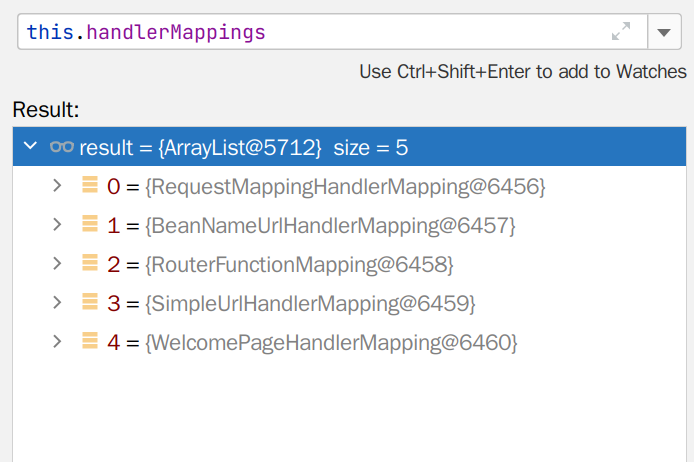
RequestMappingHandlerMapping:保存了所有@RequestMapping 和 handler 的映射规则。
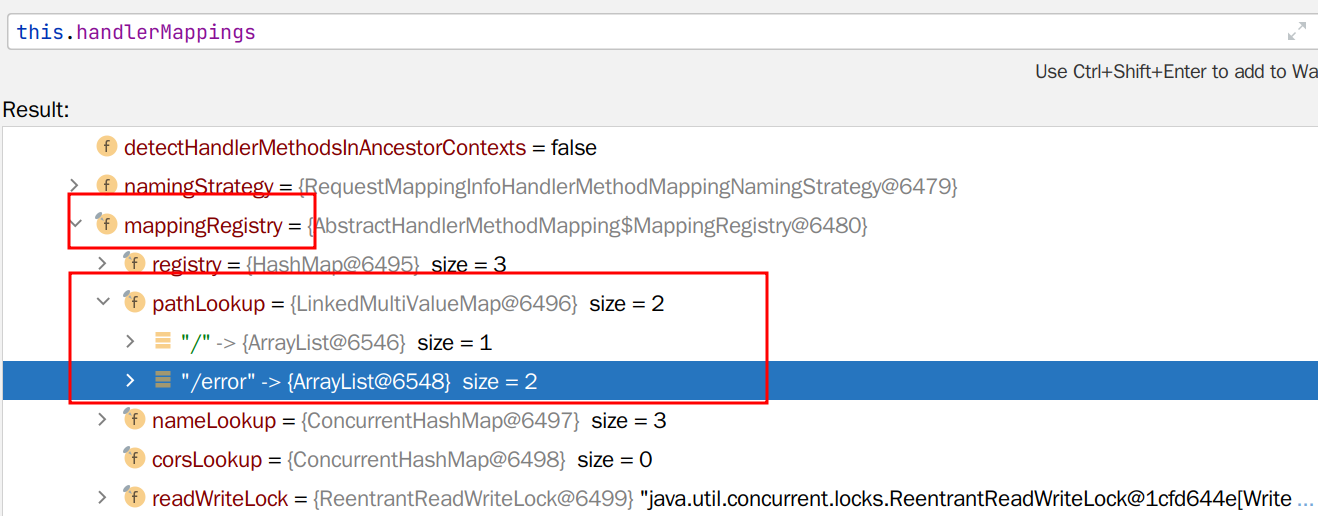
所有的请求映射都在 HandlerMapping 中。
protected HandlerExecutionChain getHandler(HttpServletRequest request) throws Exception {
    if (this.handlerMappings != null) {
        for (HandlerMapping mapping : this.handlerMappings) {
            HandlerExecutionChain handler = mapping.getHandler(request);
            if (handler != null) {
                return handler;
            }
        }
    }
    return null;
}
- SpringBoot 自动配置欢迎页的 WelcomePageHandlerMapping 。访问 /能访问到 index.html;
- SpringBoot 自动配置了默认 的 RequestMappingHandlerMapping
- 请求进来,挨个尝试所有的 HandlerMapping 看是否有请求信息。
- 如果有就找到这个请求对应的 handler
- 如果没有就是下一个 HandlerMapping
- 我们需要一些自定义的映射处理,我们也可以自己给容器中放 HandlerMapping。自定义 HandlerMapping