IOC 容器
IOC 原理
什么是 IOC
IOC(Inversion of Control, 控制反转),是面向对象编程中的一种设计原则,可以用来降低计算机代码之间的耦合度。
通过控制反转,对象在被创建的时候,由一个调控系统内所有对象的外界实体将其所依赖的对象的引用传递给它。也可以说,依赖被注入到对象中。
- 控制反转,把对象创建和对象之间的调用过程,交给 Spring 进行管理
- 使用 IOC 目的:为了耦合度降低
- 做入门案例就是 IOC 实现
IOC 底层原理
- xml 解析
- 工厂模式
- 反射
IOC 接口 (BeanFactory)
IOC 思想基于 IOC 容器完成,IOC 容器底层就是对象工厂
Spring 提供 IOC 容器实现两种方式:(两个接口)
- BeanFactory:IOC 容器使用基本实现,是 Spring 内部使用接口
- 加载配置文件的时候,不会去创建对象,在获取对象(使用)才去创建对象
- ApplicationContext:BeanFactory 接口的子接口,提供更多更强大的功能
- 加载配置文件的时候,就会创建对象
- BeanFactory:IOC 容器使用基本实现,是 Spring 内部使用接口
ApplicationContext 实现类
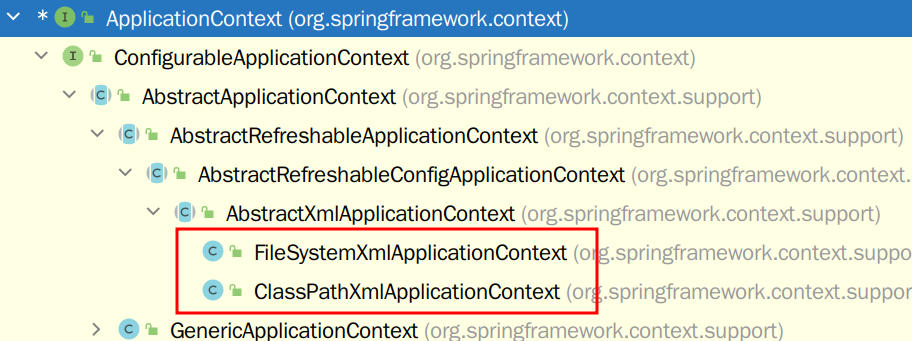
- FileSystemXmlApplicationContext 要写 xml 文件相对于系统下的类路径
- ClassPathXmlApplicatonContext 要写 xml 文件内部路径
WARNING
新版本 spring 配置文件默认扫描路径不再是 src/,而是 src/main/resourses
IOC 操作 Bean 管理
什么是 Bean 管理
Bean 指 Spring 自动创建的对象(差不多得了) Bean 管理指两个操作:
- Spring 创建对象
- Spring 注入属性
Bean 管理有两种方式实现:
- 基于 xml 配置文件方式实现
- 基于注解方式实现
FactoryBean
Spring 有两种类型 bean
- 普通 Bean: 在配置文件中定义 bean 类型就是返回类型
- 工厂 Bean: 在配置文件定义 bean 类型可以和返回类型不一样
- 创建类,让这个类作为工厂 bean,实现接口 FactoryBean
- 实现接口里面的方法,在实现的方法中定义返回的 bean 类型
nackage Bean;

import org.springframework.beans.factory.FactoryBean;

public class SuperBean implements FactoryBean<Emp> {
    @Override
    public Emp getObject() throws Exception {
        Emp emp = new Emp();
        emp.setEname("woo");
        emp.setGender("fm");

        return emp;
    }

    @Override
    public Class<?> getObjectType() {
        return null;
    }

    @Override
    public boolean isSingleton() {
        return FactoryBean.super.isSingleton();
    }
}
<bean id="superbean" class="Bean.SuperBean"></bean>
TIP
普通 Bean 配置什么类就会返回对应的对象,工厂 bean 返回的对象不是配置的类
基于 xml
创建对象
- 在 spring 配置文件中,使用 bean 标签,标签里面添加对应属性,就可以实现对象创建
- 在 bean 标签的常见属性
- id 属性:唯一标识(不能用特殊符号)
- name 属性:标识(可以用特殊符号,很少使用这个属性)
- class 属性:类全路径(包类路径)
- Bean 管理创建对象时候,默认执行无参数构造方法完成对象创建
注入属性
DI:依赖注入,就是注入属性- 第一种注入方式:使用 set 方法进行注入
- 在类中设置 set 方法
- 在 spring 配置文件配置对象创建,配置属性注入
<!-- 1 配置对象创建-->
<!-- 2 set 方法注入属性-->
<bean id = "book" class="com.demo.test.User">
    <property name="money" value="1230"></property>
    <!-- name: 类里面属性名称 -->
    <!-- value: 向属性注入的值 -->
</bean>
- 有参数构造进行注入
- 创建类,定义属性,创建属性对应有参数构造方法
- 在 spring 配置文件中配置
<bean id="orders" class="com.demo.test.Orders">
    <constructor-arg name="What" value="w"></constructor-arg>
    <constructor-arg name="Test" value="t"></constructor-arg>
    <constructor-arg index="0" value="t"></constructor-arg>
    <!-- name 表示形参的名字,value 表示值, -->
    <!-- index 表示第几个参数 -->
</bean>
- p 名称空间注入
- 添加 p 名称空间在配置文件中
- 进行属性注入
<!-- 添加 p 命名空间 -->
<beans xmlns:p="http://www.springframework.org/schema/p"
       xsi:schemaLocation="http://www.springframework.org/schema/beans http://www.springframework.org/schema/beans/spring-beans.xsd
                           http://www.springframework.org/schema/p http://www.springframework.org/schema/p/spring-p.xsd">

    <bean id="book" class="com.demo.test.Book" p:What="w" p:Test="t">
    </bean>
</beans>
TIP
使用 p 名称空间注入,可以简化基于 xml 配置方式
注入其他类型属性(字面量)
<!-- 空 -->
<property name="address">
    <null/>
</property>

<!-- 特殊符号要转义 -->
<!-- 把带特殊符号内容写进 CDATA -->
<property name="address">
    <value><![CDATA[<<what>>]]></value>
</property>
外部 bean
- 创建两个类 service 类和 tool 类
- 在 service 里调用 tool 里的方法
- 在 spring 配置文件中配置
//------------------------------------------service

package Service;

import Tools.Tool;

public class Service {
    private Tool t;
    public void setT(Tool t) {
        this.t = t;
    }

    public void add(){
        System.out.println("adding");
        t.run();
    }
}


//------------------------------------------tool

package Tools;

public class ToolImp implements Tool {
    @Override
    public void run() {
        System.out.println("running");
    }
}

//------------------------------------------test

package Test;

import Service.Service;
import org.junit.Test;
import org.springframework.context.ApplicationContext;
import org.springframework.context.support.ClassPathXmlApplicationContext;

public class TestTools {
    @Test
    public void testToolimp(){
        ApplicationContext context =
                new ClassPathXmlApplicationContext("bean2.xml");

        Service service = context.getBean("service", Service.class);
        System.out.println(service);
        service.add();

    }
}
配置文件:
<?xml version="1.0" encoding="UTF-8"?>
<beans xmlns="http://www.springframework.org/schema/beans"
       xmlns:xsi="http://www.w3.org/2001/XMLSchema-instance"
       xsi:schemaLocation="http://www.springframework.org/schema/beans http://www.springframework.org/schema/beans/spring-beans.xsd">

    <bean id="service" class="Service.Service">
        <!-- 使用外部 bean 用 ref 引入 -->
        <property name="t" ref="toolImp"></property>
    </bean>
    <bean id="toolImp" class="Tools.ToolImp"></bean>

</beans>
内部 bean 和 级联赋值
- 一对多关系:部门和员工
- 在实体类之间表示一对多关系,使用集合和对象表示
<?xml version="1.0" encoding="UTF-8"?>
<beans xmlns="http://www.springframework.org/schema/beans"
       xmlns:xsi="http://www.w3.org/2001/XMLSchema-instance"
       xsi:schemaLocation="http://www.springframework.org/schema/beans http://www.springframework.org/schema/beans/spring-beans.xsd">
    <bean id="emp" class="Bean.Emp">
        <!--普通属性-->
        <property name="ename" value="tom"></property>
        <property name="gender" value="m"></property>
        <!--对象类型属性 内部 bean-->
        <property name="depen">
            <bean id="dept" class="Bean.Dep">
                <property name="dname" value="foo"></property>
            </bean>
        </property>
    </bean>

</beans>
- 外部 Bean 写法
<?xml version="1.0" encoding="UTF-8"?>
<beans xmlns="http://www.springframework.org/schema/beans"
       xmlns:xsi="http://www.w3.org/2001/XMLSchema-instance"
       xsi:schemaLocation="http://www.springframework.org/schema/beans http://www.springframework.org/schema/beans/spring-beans.xsd">
    <bean id="emp" class="Bean.Emp">
        <!--普通属性-->
        <property name="ename" value="tom"></property>
        <property name="gender" value="m"></property>
        <!--级联赋值-->
        <property name="depen" ref="dep"></property>
    </bean>
    <bean id="dep" class="Bean.Dep">
        <property name="dname" value="rich"></property>
    </bean>

</beans>
- 第二种写法(需要有属性的 getter 方法)
<?xml version="1.0" encoding="UTF-8"?>
<beans xmlns="http://www.springframework.org/schema/beans"
       xmlns:xsi="http://www.w3.org/2001/XMLSchema-instance"
       xsi:schemaLocation="http://www.springframework.org/schema/beans http://www.springframework.org/schema/beans/spring-beans.xsd">
    <bean id="emp" class="Bean.Emp">
        <!--普通属性-->
        <property name="ename" value="tom"></property>
        <property name="gender" value="m"></property>
        <!--级联赋值-->
        <property name="depen" ref="dep"></property>
        <property name="depen.dname" value="rich"></property>
    </bean>
    <bean id="dep" class="Bean.Dep"></bean>

</beans>
注入集合属性
- 注入数组类型属性
- 注入 List 集合类型属性
- 注入 Map 集合类型属性
- 创建类,并设置集合和对应的 setter 方法
- 配置 Spring 配置文件
<?xml version="1.0" encoding="UTF-8"?>
<beans xmlns="http://www.springframework.org/schema/beans"
       xmlns:xsi="http://www.w3.org/2001/XMLSchema-instance"
       xsi:schemaLocation="http://www.springframework.org/schema/beans http://www.springframework.org/schema/beans/spring-beans.xsd">
    <bean id="stu" class="Bean.Stu">
        <property name="courses">
            <array>
                <value>1</value>
                <value>2</value>
            </array>
        </property>
        <property name="lists">
            <list>
                <value>1</value>
                <value>2</value>
            </list>
        </property>
        <property name="maps">
            <map>
                <entry key="what" value="1"></entry>
                <entry key="what2" value="2"></entry>
            </map>
        </property>
       <property name="sets">
           <set>
               <value>1</value>
               <value>2</value>
           </set>
       </property>
    </bean>

</beans>
- 在集合里设置对象类型值
<bean id="" class="">
    <property name="sets">
        <set>
            <ref bean="emp1"></ref>
            <ref bean="emp2"></ref>
        </set>
    </property>
</bean>

<bean id="emp1" class="Bean.Emp">
    <property name="ename" value="yeah"></property>
</bean>
<bean id="emp2" class="Bean.Emp">
    <property name="ename" value="yeahyeah"></property>
</bean>
- 把集合注入部分提取出来
- 在 spring 配置文件中引入名称空间 util
- 使用 util 标签完成 list 集合注入提取
<?xml version="1.0" encoding="UTF-8"?>
<beans xmlns="http://www.springframework.org/schema/beans"
       xmlns:xsi="http://www.w3.org/2001/XMLSchema-instance"
       xmlns:util="http://www.springframework.org/schema/util"
       xsi:schemaLocation="http://www.springframework.org/schema/beans http://www.springframework.org/schema/beans/spring-beans.xsd
                           http://www.springframework.org/schema/util http://www.springframework.org/schema/util/spring-util.xsd">
    <util:list id="suai">
        <value>1</value>
        <value>2</value>
        <value>3</value>
    </util:list>

    <bean id="what" class="Bean.Stu">
        <property name="lists" ref="suai"></property>
    </bean>

</beans>
Xml 自动装配
根据指定装配规则(属性名称或属性类型),Spring 自动将匹配的属性值进行注入
根据名称注入://这里的 Emp 有一个名为 dept2 的对象属性,所有这里会选 dept2 注入
<bean id="emp" class="Bean.autowire.Emp" autowire="byName"></bean>
<bean id="dept1" class="Bean.autowire.Dept">
<property name="name" value="ha"></property>
</bean>
<bean id="dept2" class="Bean.autowire.Dept">
<property name="name" value="hasss"></property>
</bean>
//这里的 Emp 有一个名为 dept2 的对象属性,而 byType 的注入方式会选择类型相同的属性注入,无论名称
<bean id="emp" class="Bean.autowire.Emp" autowire="byType"></bean>
<bean id="dept1" class="Bean.autowire.Dept">
    <property name="name" value="ha"></property>
</bean>
WARNING
根据类型注入时,请保证配置文件中只有一个相同类型的 bean 标签,因为根据类型注入不会判断名称,只会判断类型
TIP
一般不使用 xml 的自动注入,而是使用注解的自动注入
外部属性文件
例:配置数据库信息
- 直接配置数据库信息
- 配置德鲁伊连接池
- 引入德鲁伊连接池依赖 jar 包
<bean id="dataSource" class="com.alibaba.druid.pool.DruidDataSource" >
    <property name="driveClassName" value="com.mysql.jdbc.Driver"></property>
    <property name="url" value="jdbc:mysql://localhost:3366/userDB"></property>
    <property name="username" value="root"></property>
    <property name="password" value="root"></property>
</bean>
- 引入外部属性文件配置数据库连接池
- 创建外部属性文件, properties 格式文件,写数据库信息
- 把外部 properties 属性文件引入到 spring 配置文件中
- 引入 context 名称空间
- 在 spring 配置文件使用标签引入外部属性文件
// jdbc.properties 文件
driveClassName=com.mysql.jdbc.Driver
url=com.mysql.jdbc.Driver
username=root
password=root
<context:property-placeholder localtion="classPath:jdbc.properties"/>

<bean id="dataSource" class="com.alibaba.druid.pool.DruidDataSource" >
    <property name="driveClassName" value="${driveClassName}"></property>
    <property name="url" value="${url}"></property>
    <property name="username" value="${username}"></property>
    <property name="password" value="${password}"></property>
</bean>
Bean 作用域
Bean 作用域指 Bean 是单实例对象还是多实例对象
默认创建的 Bean 为单实例对象
package Test;

import Bean.Emp;
import org.junit.Test;
import org.springframework.context.ApplicationContext;
import org.springframework.context.support.ClassPathXmlApplicationContext;

public class TestBean {
    @Test
    public void test(){
        ApplicationContext context =
                new ClassPathXmlApplicationContext("bean3.xml");
        Emp emp1 = context.getBean("emp", Emp.class);
        Emp emp2 = context.getBean("emp", Emp.class);
        System.out.println(emp1);  //Bean.Emp@401e7803
        System.out.println(emp2);  //Bean.Emp@401e7803 emp1 与 emp2 指向同一个对象
    }
}
更改实例模式
- Spring 配置文件 bean 标签里面的属性(scope)用于设置实例对象是单例还是多例
- scope
- singleton 表示单实例对象
- prototype 表示多实例对象
<bean id="emp" class="Bean.Emp" scope="prototype"></bean>
TIP
单实例模式会在加载 context 配置时就创建对象,而多实例模式在手动创建对象时才会起作用
Bean 的生命周期
- 通过构造器创建 bean 实例(无参数构造)
- 为 bean 的属性设置值和对其他 Bean 引用(调用 set 方法)
- 初始化
- 把 bean 实例传递 bean 后置处理器的方法
postProccessBeforeInitialization - 调用 bean 的初始化的方法(需要进行配置初始化的方法)
- 把 bean 实例传递 bean 后置处理器的方法
postProccessAfterInitialization
- 把 bean 实例传递 bean 后置处理器的方法
- bean 可以使用了(对象获取到了)
- 当容器关闭时候,调用 bean 的销毁的方法(需要进行配置销毁的方法)
初始化函数和销毁函数
- 在需要创建的类里写好初始化函数和销毁函数
- 在 Spring 配置文件中的 bean 标签中加上
init-method和destroy-method
public void init() {
    System.out.println("Initiaziation");
}

public void destroy() {
    System.out.println("finish");
}
<bean id="emp" class="Bean.Emp" scope="prototype" init-method="init" destroy-method="destroy"></bean>
添加后置处理器
- 创建类,实现接口 BeanPostProcessor,创建后置处理器
- 在 Spring 配置文件加入该类的 bean 标签
package Bean;

import org.springframework.beans.BeansException;
import org.springframework.beans.factory.config.BeanPostProcessor;


public class BeanPost implements BeanPostProcessor {
    @Override
    public Object postProcessBeforeInitialization(Object bean, String beanName) throws BeansException {
        System.out.println("Before Init");
        return bean;
    }

    @Override
    public Object postProcessAfterInitialization(Object bean, String beanName) throws BeansException {
        System.out.println("After Init");
        return bean;
    }
}
<bean id="beanpost" class="Bean.BeanPost"></bean>
TIP
Spring 默认会将该 xml 下的所有 bean 加上该 post
基于注解
注解:
- 注解时代码特殊标记,格式:@注解名称(属性名称=属性值,属性名称=属性值..)
- 例:写法上
@Component(value="userService") = <bean id="userService" class=".."></bean>,value 属性也可以省略不写,默认值是类名称
- 例:写法上
- 使用注解,注解作用在类上,方法上,属性上
- 使用注解的目的:简化 xml 配置
@Component,普通组建@Service,业务逻辑层 service 层@Controller,web 层@Repository,dao 层或 mapper 层
TIP
四个注解都是一样的,都可以用来创建 bean 实例
基于注解方式实现对象创建
- 引入依赖(
spring-aop-x.x.x.RELEASE.jar) - 加入 context 命名空间
- 开启组件扫描
- 扫描多个包
- 多个包使用逗号隔开
- 扫描包上层目录
- 扫描多个包
<!-- 这里表示包 com.demo.test 下的所有类都进行扫描 -->
<context:component-scan base-package="com.demo.test"></context:component-scan>


<!--
    这里表示只对包 com.demo.test 下注解为@Controller 的类进行扫描

    use-default-filters="false" 表示现在不使用默认 filter,自己配置 filter
    context:include-filter,设置扫描哪些内容
-->
<context:component-scan base-package="com.demo.test" use-default-filters="false">
    <context:include-filter type="annotation"
                            expression="org.springframework.stereotype.Controller"/>
</context:component-scan>


<!--
    这里表示只对包 com.demo.test 下除注解为@Controller 的类以外的所有类进行扫描

    context:exclude-filter:  设置哪些内容不扫描
-->
<context:component-scan base-package="com.demo.test">
    <context:exclude-filter type="annotation"
                            expression="org.springframework.stereotype.Controller"/>
</context:component-scan>
- 创建类,在类上加上注解
基于注解方式实现属性注入
@Autowired: 根据属性类型进行自动装配@Qualifier: 根据属性名称进行注入@Resource: 可以根据类型注入,也可以根据名称注入@Value: 注入普通类型属性
@Autowired 和 @Qualifier
例:// DaoImp.java
package com.demo.test.dao;
import org.springframework.stereotype.Repository;
@Repository
public class DaoImp implements Dao{
@Override
public void add() {
System.out.println("dao adding");
}
}
// Service.java
package com.demo.test.service;
import com.demo.test.dao.DaoImp;
import org.springframework.beans.factory.annotation.Autowired;
import org.springframework.stereotype.Component;
@Component
public class Service{
@Autowired
private DaoImp dao;
public void add(){
System.out.println("service adding");
dao.add();
}
}
WARNING
@Qualifier 标签必须和@Autowired 一起使用
即: @Autowired @Qualifier(value = “userA”)
@Resource
@Resource 既可以实现基于类型的注入,也可以实现基于名称的注入
//基于类型注入
@Resource

//基于名称注入
@Resource(name = "userDaoImpl")
TIP
@Resource 注解隶属于原生 java( javax.annotation.Resource ),而不是 Spring 依赖
因此,Spring 建议我们使用@Autowired,@Qualifier
@Value
可以注入普通类型的属性
@Value(value = "abc")
private String name;
完全注解开发
- 创建配置类,替代 xml 配置文件
@Configuration
@ComponentScan(basePackages = {"com.demo.test"})
public class SpringConfig {
}
- 编写测试类
public class TestBean {
    @Test
    public void test(){
        ApplicationContext context
                = new AnnotationConfigApplicationContext(SpringConfig.class);
        Service service = context.getBean(Service.class);
        System.out.println(service);
        service.add();
    }
}