自定义映射 resultMap
resultMap 处理字段和属性的映射关系
resultMap:设置自定义映射
- 属性:
- id:表示自定义映射的唯一标识,不能重复
- type:查询的数据要映射的实体类的类型
- 子标签:
- id:设置主键的映射关系
- result:设置普通字段的映射关系
- 子标签属性:
- property:设置映射关系中实体类中的属性名
- column:设置映射关系中表中的字段名
- 属性:
若字段名和实体类中的属性名不一致,则可以通过 resultMap 设置自定义映射,即使字段名和属性名一致的属性也要映射,也就是全部属性都要列出来
<resultMap id="empResultMap" type="Emp">
	<id property="eid" column="eid"></id>
	<result property="empName" column="emp_name"></result>
	<result property="age" column="age"></result>
	<result property="sex" column="sex"></result>
	<result property="email" column="email"></result>
</resultMap>
<!--List<Emp> getAllEmp();-->
<select id="getAllEmp" resultMap="empResultMap">
	select * from t_emp
</select>
若字段名和实体类中的属性名不一致,但是字段名符合数据库的规则(使用_),实体类中的属性名符合 Java 的规则(使用驼峰)。此时也可通过以下两种方式处理字段名和实体类中的属性的映射关系
- 可以通过为字段起别名的方式,保证和实体类中的属性名保持一致
<!--List<Emp> getAllEmp();--> <select id="getAllEmp" resultType="Emp"> select eid,emp_name empName,age,sex,email from t_emp </select>- 可以在 MyBatis 的核心配置文件中的 setting 标签中,设置一个全局配置信息
mapUnderscoreToCamelCase,可以在查询表中数据时,自动将_类的字段名转换为驼峰,例如:字段名user_name,设置了mapUnderscoreToCamelCase,此时字段名就会转换为userName。 核心配置文件详解
<settings>
    <!--将表中字段的下划线自动转换为驼峰-->
    <setting name="mapUnderscoreToCamelCase" value="true"/>
</settings>
多对一映射
查询员工信息以及员工所对应的部门信息
public class Emp {
	private Integer eid;
	private String empName;
	private Integer age;
	private String sex;
	private String email;
	private Dept dept;
	//...构造器、get、set 方法等
}
级联方式处理映射关系
<resultMap id="empAndDeptResultMapOne" type="Emp">
	<id property="eid" column="eid"></id>
	<result property="empName" column="emp_name"></result>
	<result property="age" column="age"></result>
	<result property="sex" column="sex"></result>
	<result property="email" column="email"></result>
	<result property="dept.did" column="did"></result>
	<result property="dept.deptName" column="dept_name"></result>
</resultMap>
<!--Emp getEmpAndDept(@Param("eid")Integer eid);-->
<select id="getEmpAndDept" resultMap="empAndDeptResultMapOne">
	select * from t_emp left join t_dept on t_emp.eid = t_dept.did where t_emp.eid = #{eid}
</select>
使用 association 处理映射关系
association:处理多对一的映射关系 property:需要处理多对的映射关系的属性名 javaType:该属性的类型
<resultMap id="empAndDeptResultMapTwo" type="Emp">
	<id property="eid" column="eid"></id>
	<result property="empName" column="emp_name"></result>
	<result property="age" column="age"></result>
	<result property="sex" column="sex"></result>
	<result property="email" column="email"></result>
	<association property="dept" javaType="Dept">
		<id property="did" column="did"></id>
		<result property="deptName" column="dept_name"></result>
	</association>
</resultMap>
<!--Emp getEmpAndDept(@Param("eid")Integer eid);-->
<select id="getEmpAndDept" resultMap="empAndDeptResultMapTwo">
	select * from t_emp left join t_dept on t_emp.eid = t_dept.did where t_emp.eid = #{eid}
</select>
一对多映射
public class Dept {
    private Integer did;
    private String deptName;
    private List<Emp> emps;
	//...构造器、get、set 方法等
}
collection
- collection:用来处理一对多的映射关系
- ofType:表示该属性对饮的集合中存储的数据的类型
<resultMap id="DeptAndEmpResultMap" type="Dept">
	<id property="did" column="did"></id>
	<result property="deptName" column="dept_name"></result>
	<collection property="emps" ofType="Emp">
		<id property="eid" column="eid"></id>
		<result property="empName" column="emp_name"></result>
		<result property="age" column="age"></result>
		<result property="sex" column="sex"></result>
		<result property="email" column="email"></result>
	</collection>
</resultMap>
<!--Dept getDeptAndEmp(@Param("did") Integer did);-->
<select id="getDeptAndEmp" resultMap="DeptAndEmpResultMap">
	select * from t_dept left join t_emp on t_dept.did = t_emp.did where t_dept.did = #{did}
</select>
分步查询
查询部门信息
/**
 * 通过分步查询,查询部门及对应的所有员工信息
 * 分步查询第一步:查询部门信息
 * @param did
 * @return com.atguigu.mybatis.pojo.Dept
 * @date 2022/2/27 22:04
 */
Dept getDeptAndEmpByStepOne(@Param("did") Integer did);
<resultMap id="DeptAndEmpByStepOneResultMap" type="Dept">
	<id property="did" column="did"></id>
	<result property="deptName" column="dept_name"></result>
	<collection property="emps"
				select="com.atguigu.mybatis.mapper.EmpMapper.getDeptAndEmpByStepTwo"
				column="did"></collection>
</resultMap>
<!--Dept getDeptAndEmpByStepOne(@Param("did") Integer did);-->
<select id="getDeptAndEmpByStepOne" resultMap="DeptAndEmpByStepOneResultMap">
	select * from t_dept where did = #{did}
</select>
根据部门 id 查询部门中的所有员工
/**
 * 通过分步查询,查询部门及对应的所有员工信息
 * 分步查询第二步:根据部门 id 查询部门中的所有员工
 * @param did
 * @return java.util.List<com.atguigu.mybatis.pojo.Emp>
 * @date 2022/2/27 22:10
 */
List<Emp> getDeptAndEmpByStepTwo(@Param("did") Integer did);
<!--List<Emp> getDeptAndEmpByStepTwo(@Param("did") Integer did);-->
<select id="getDeptAndEmpByStepTwo" resultType="Emp">
	select * from t_emp where did = #{did}
</select>
延迟加载
- 分步查询的优点:可以实现延迟加载,但是必须在核心配置文件中设置全局配置信息:
- lazyLoadingEnabled:延迟加载的全局开关。当开启时,所有关联对象都会延迟加载
- aggressiveLazyLoading:当开启时,任何方法的调用都会加载该对象的所有属性。 否则,每个属性会按需加载
- 此时就可以实现按需加载,获取的数据是什么,就只会执行相应的 sql。此时可通过 association 和 collection 中的 fetchType 属性设置当前的分步查询是否使用延迟加载,
fetchType="lazy(延迟加载)|eager(立即加载)"
<settings>
	<!--开启延迟加载-->
	<setting name="lazyLoadingEnabled" value="true"/>
</settings>
@Test
public void getEmpAndDeptByStepOne() {
	SqlSession sqlSession = SqlSessionUtils.getSqlSession();
	EmpMapper mapper = sqlSession.getMapper(EmpMapper.class);
	Emp emp = mapper.getEmpAndDeptByStepOne(1);
	System.out.println(emp.getEmpName());
}
- 关闭延迟加载,两条 SQL 语句都运行了

- 开启延迟加载,只运行获取 emp 的 SQL 语句

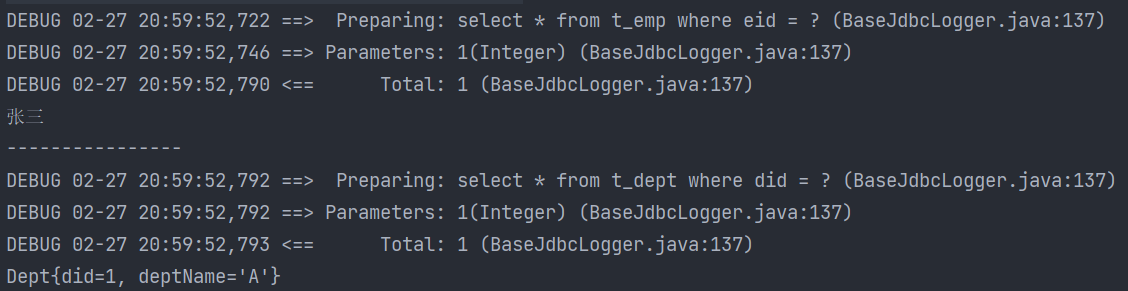
@Test
public void getEmpAndDeptByStepOne() {
	SqlSession sqlSession = SqlSessionUtils.getSqlSession();
	EmpMapper mapper = sqlSession.getMapper(EmpMapper.class);
	Emp emp = mapper.getEmpAndDeptByStepOne(1);
	System.out.println(emp.getEmpName());
	System.out.println("----------------");
	System.out.println(emp.getDept());
}
- 开启后,需要用到查询 dept 的时候才会调用相应的 SQL 语句
- fetchType:当开启了全局的延迟加载之后,可以通过该属性手动控制延迟加载的效果,
fetchType="lazy(延迟加载)|eager(立即加载)
- fetchType:当开启了全局的延迟加载之后,可以通过该属性手动控制延迟加载的效果,
	<resultMap id="empAndDeptByStepResultMap" type="Emp">
		<id property="eid" column="eid"></id>
		<result property="empName" column="emp_name"></result>
		<result property="age" column="age"></result>
		<result property="sex" column="sex"></result>
		<result property="email" column="email"></result>
		<association property="dept"
					 select="com.atguigu.mybatis.mapper.DeptMapper.getEmpAndDeptByStepTwo"
					 column="did"
					 fetchType="lazy"></association>
	</resultMap>
	```